Okay, so you’re curious about Bitcoin? It can seem a little daunting at first, all those technical terms and security concerns. But honestly, sending and receiving Bitcoin is becoming surprisingly straightforward. This guide is designed to take you from complete beginner to confidently managing your own digital currency, with plenty of visuals to help you along the way. We’ll break down everything, step-by-step, so you can feel secure and in control.
We’ll cover everything from understanding different wallet types – think of them as your digital bank accounts – to actually making transactions, using ATMs, and even navigating exchanges. We’ll also dive into security best practices because, let’s face it, keeping your Bitcoin safe is
-the* most important thing. This isn’t just about the ‘how,’ it’s about understanding
-why* things work the way they do, empowering you to make informed decisions.
Introduction to Bitcoin & Digital Wallets
Bitcoin, the first and most well-known cryptocurrency, has revolutionized the way we think about money. Unlike traditional currencies issued by governments, Bitcoin is decentralized, meaning no single entity controls it. This decentralization, coupled with its cryptographic security, makes it a fascinating and increasingly popular alternative to traditional financial systems. But to participate in the Bitcoin world, you need a way to store, send, and receive it – that’s where digital wallets come in.
Think of a Bitcoin wallet not as a physical wallet holding coins, but as a software program or hardware device that manages the cryptographic keys used to access your Bitcoin. These keys allow you to prove ownership and authorize transactions. Understanding the different types of wallets and their security implications is crucial before diving in.
Bitcoin Wallets: A Variety of Options
There isn’t a one-size-fits-all Bitcoin wallet. The best choice depends on your individual needs and risk tolerance. Here’s a breakdown of the most common types:
- Hardware Wallets: These are physical devices, resembling USB drives, that store your private keys offline. They are considered the most secure option, as your keys are never exposed to the internet.
- Software Wallets: These are applications you install on your computer or smartphone. They offer a good balance of convenience and security, but are vulnerable to malware if your device is compromised. Examples include Electrum and Exodus.
- Online/Exchange Wallets: These wallets are hosted by cryptocurrency exchanges. They are the most convenient for trading, but also the least secure, as you are trusting the exchange to protect your keys.
- Paper Wallets: These involve printing your public and private keys on a piece of paper. While highly secure when created and stored properly, they are susceptible to physical damage or loss.
Wallet Security: Convenience vs. Control
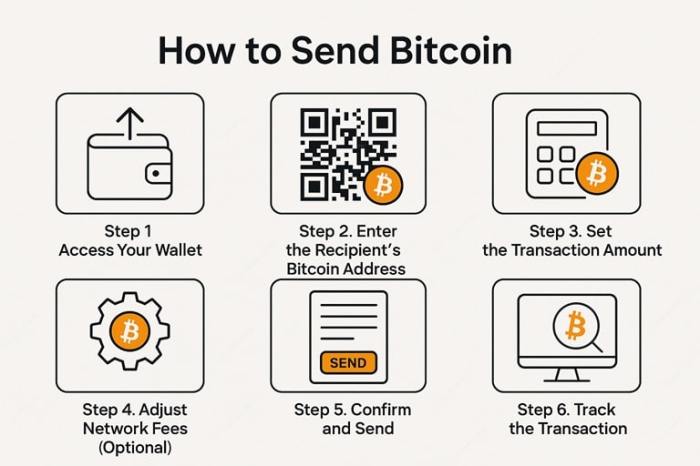
Source: insidebitcoins.com
Security and convenience often exist on a spectrum. The more control you have over your keys, the more secure your Bitcoin is likely to be, but the more responsibility you have to protect them. A hardware wallet offers the highest level of security, but requires a physical device and a bit of technical know-how. An exchange wallet is the most convenient, but you’re essentially entrusting your funds to a third party.
Carefully consider your needs and risk tolerance when choosing a wallet.
| Wallet Type | Security | Pros | Cons |
|---|---|---|---|
| Hardware | Highest | Offline storage, highly secure, full control | Costly, requires technical understanding |
| Software | Medium | Free, convenient, easy to use | Vulnerable to malware, requires device security |
| Online/Exchange | Low | Very convenient for trading, easy access | Third-party risk, potential for hacks, loss of control |
| Paper | High (if stored correctly) | Free, offline storage, full control | Susceptible to physical damage/loss, requires careful storage |
Setting Up Your First Bitcoin Wallet
Choosing a wallet is the first step, but actually getting it set up is where things become real. For this example, we’ll walk through setting up a software wallet, specifically Exodus, as it’s known for its user-friendly interface. The process is similar for other software wallets like Electrum, though the specific steps may vary.
Downloading and Installing a Software Wallet (Exodus)
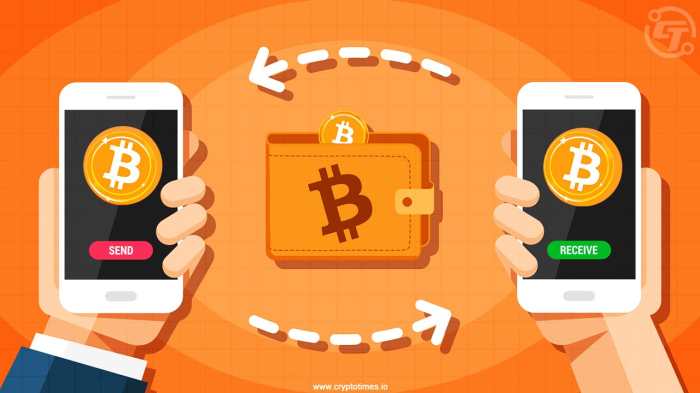
Source: cryptotimes.io
First, head to the official Exodus website (exodus.com) and download the version compatible with your operating system (Windows, macOS, or Linux). Always download directly from the official website to avoid downloading malware. Once downloaded, run the installer and follow the on-screen instructions. The installation process is straightforward and similar to installing any other software application.
The Importance of Your Seed Phrase
This is the most critical part of the entire process. When you first open Exodus, it will generate a 12-word seed phrase (also known as a recovery phrase). This phrase is the
-only* way to recover your Bitcoin if you lose access to your wallet – whether you lose your computer, forget your password, or your hard drive crashes.
Treat this phrase like the keys to your bank account. Never share it with anyone, and never store it digitally (e.g., in a text file, email, or cloud storage).
Securing Your Seed Phrase
The best way to store your seed phrase is offline. Consider these options:
- Write it down on paper: Use a pen and paper, and store the paper in a secure, fireproof, and waterproof location.
- Engrave it on metal: Metal seed phrase storage devices are available and offer excellent durability.
- Split it up: Divide the phrase into multiple parts and store them in separate secure locations.
Avoid taking a picture of your seed phrase or storing it on any digital device. Redundancy is also a good idea – consider creating multiple backups of your seed phrase and storing them in different locations.
Step-by-Step Wallet Setup & Seed Phrase Backup (Exodus)
- Download and Install: Download Exodus from exodus.com and install it on your computer.
- Create a New Wallet: Open Exodus and click “Create New Wallet.”
- Write Down Your Seed Phrase: Exodus will display your 12-word seed phrase. Carefully write it down on paper, in the correct order.
- Verify Your Seed Phrase: Exodus will ask you to verify your seed phrase by entering the words in the correct order. This ensures you’ve written it down correctly.
- Set a Password: Create a strong password for your Exodus wallet. This password protects your wallet from unauthorized access on your computer.
- Backup Complete: Your wallet is now set up and your seed phrase is backed up!
Understanding Bitcoin Addresses
To receive Bitcoin, you need a Bitcoin address. Think of it like your bank account number – it’s a unique identifier that allows others to send Bitcoin to you. However, Bitcoin addresses are a bit more complex than traditional bank account numbers. They are generated from your public key, which is derived from your private key (the key secured by your wallet).
The Structure of a Bitcoin Address
A Bitcoin address is typically a string of 26-35 alphanumeric characters. It begins with either ‘1’, ‘3’, or ‘bc1’. The address is a Base58Check encoded representation of your public key hash. This encoding ensures that the address is readable and that errors are detected during transactions. It’s crucial to copy and paste the address correctly, as even a single incorrect character will result in the loss of funds.
Bitcoin Address Formats: Legacy, SegWit, and Native SegWit
Over time, different Bitcoin address formats have emerged to improve efficiency and security. Here’s a breakdown:
- Legacy (P2PKH): These addresses start with ‘1’. They are the oldest format and have the highest transaction fees.
- SegWit (P2SH): These addresses start with ‘3’. They were introduced to enable Segregated Witness (SegWit), a protocol upgrade that improved transaction capacity and reduced fees.
- Native SegWit (Bech32): These addresses start with ‘bc1’. They are the newest format and offer the lowest transaction fees and improved error detection.
Advantages and Disadvantages of Each Format
Source: cryptomus.com
Choosing the right address format can impact your transaction fees and compatibility with certain wallets and exchanges. Native SegWit (bc1) is generally the preferred format due to its lower fees and improved security, but not all wallets and exchanges support it yet. Legacy addresses (starting with ‘1’) are the most widely supported but have the highest fees.
| Address Format | Structure | Fees | Compatibility |
|---|---|---|---|
| Legacy (P2PKH) | Starts with ‘1’ | Highest | Widely supported |
| SegWit (P2SH) | Starts with ‘3’ | Medium | Good support |
| Native SegWit (Bech32) | Starts with ‘bc1’ | Lowest | Growing support |
End of Discussion
So there you have it! Sending and receiving Bitcoin doesn’t have to be scary. It’s a process that, with a little understanding and the right tools, can be surprisingly simple and empowering. Remember, security is paramount – protect your seed phrase like it’s the key to a treasure chest! Don’t rush, double-check addresses, and take advantage of the resources available to you.
The world of Bitcoin is constantly evolving, but the core principles remain the same. This guide provides a solid foundation for you to build upon. Now go forth, explore, and experience the freedom and potential of decentralized finance. And remember, always do your own research!
User Queries
What happens if I send Bitcoin to the wrong address?
Unfortunately, Bitcoin transactions are irreversible. If you send Bitcoin to an incorrect address, it’s likely lost. Always double-check the recipient’s address before sending!
Is it safe to store Bitcoin on an exchange?
While convenient, storing Bitcoin on an exchange carries risks. Exchanges can be hacked, or they might freeze your funds. It’s generally safer to store your Bitcoin in a personal wallet where you control the private keys.
What is a seed phrase and why is it important?
A seed phrase (or recovery phrase) is a series of words that allows you to recover your Bitcoin wallet if you lose access to it. It’s
-crucially* important to back it up securely offline and never share it with anyone.
How long does a Bitcoin transaction take?
Transaction times can vary depending on network congestion and the transaction fee you pay. Generally, transactions are confirmed within 10-60 minutes, but can sometimes take longer.
What are transaction fees and how do I determine the right amount?
Transaction fees are paid to miners to process your transaction. Wallets usually estimate a suitable fee based on current network conditions. Higher fees generally result in faster confirmation times.
