Okay, so you’ve finally gotten your Bitcoin and now you’re thinking about
-really* securing it? Smart move. Leaving your crypto on an exchange is a bit like leaving cash under the mattress – convenient, but not exactly the safest option. This guide is all about taking control and moving your Bitcoin to a cold wallet, giving you peace of mind knowing your funds are truly yours.
It can seem daunting, but trust me, it’s worth the effort.


We’ll break down everything from understanding the risks involved, setting up your cold wallet correctly, and walking through the actual transfer process step-by-step. We’ll even cover some advanced security tips and troubleshooting, so you’re prepared for anything. Think of this as your comprehensive playbook for keeping your Bitcoin safe and sound.
Safely Transferring Bitcoin: From Exchange to Cold Wallet
Moving your Bitcoin from an exchange to a cold wallet is a crucial step in securing your investment. While exchanges offer convenience, they are also potential targets for hackers. Cold storage, on the other hand, puts you in complete control of your private keys, significantly reducing the risk of loss. This guide will walk you through the process, covering everything from understanding the risks to advanced security measures.
This isn’t about being paranoid; it’s about being responsible. Think of it like this: you wouldn’t leave a large sum of cash lying around your house. A cold wallet is like a secure vault for your Bitcoin.
Understanding the Risks of Bitcoin Transfers
Transferring Bitcoin isn’t inherently risky, but the surrounding ecosystem presents several potential vulnerabilities. It’s important to be aware of these threats to protect your funds. Phishing attacks, where scammers attempt to trick you into revealing your exchange credentials, are common. Malware on your computer could also compromise your security, logging your keystrokes or stealing your private keys. Perhaps the biggest risk is the exchange itself – exchanges can be hacked, and while many offer insurance, recovering your funds isn’t always guaranteed.
The key difference lies in where your private keys are stored. A hot wallet, like the one on an exchange, is connected to the internet, making it convenient but also vulnerable. A cold wallet, however, stores your keys offline, drastically reducing the attack surface. Imagine the difference between keeping your car keys in your pocket (hot wallet) versus a locked safe (cold wallet).
Potential loss scenarios include sending Bitcoin to the wrong address (a simple typo can be devastating), falling victim to a phishing scam, or the exchange being compromised. Mitigating these risks requires diligence, careful verification, and a strong understanding of the process.
Here’s a quick comparison of wallet types:
| Wallet Type | Security Level | Convenience | Cost |
|---|---|---|---|
| Exchange | Low | High | Free |
| Software (Desktop/Mobile) | Medium | Medium | Free |
| Hardware | High | Medium | Low-High |
| Paper | High | Low | Low |
Preparing Your Cold Wallet
Setting up a hardware wallet is the foundation of secure cold storage. The process involves generating a seed phrase – a series of words that allows you to recover your Bitcoin if your wallet is lost or damaged. This seed phrase is
-critical*; treat it like the master key to your Bitcoin fortune. Most hardware wallets will guide you through this process, typically displaying the seed phrase on the device’s screen for you to write down.
Never, ever, take a screenshot or store your seed phrase digitally.
Before using any hardware wallet, verify its authenticity. Purchase directly from the manufacturer or a reputable reseller. Inspect the packaging for signs of tampering. Once you have your wallet, protect your seed phrase with your life. Store it in a secure, offline location – a safe deposit box, a fireproof safe, or even split across multiple locations.
Consider using metal seed phrase storage solutions for added durability.
Here’s a checklist for initial cold wallet setup:
- Update the firmware to the latest version.
- Create a strong PIN code.
- Consider using a passphrase for an extra layer of security.
- Carefully write down your seed phrase and verify its accuracy.
- Store your seed phrase securely offline.
- Test the recovery process with a small amount of Bitcoin.
Initiating the Transfer from the Exchange
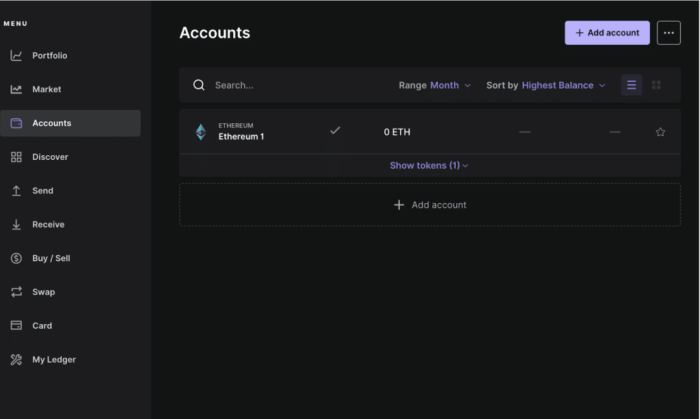
To withdraw Bitcoin from an exchange, you’ll need your cold wallet’s Bitcoin address. This is a long string of characters that identifies your wallet. You’ll also need to understand network confirmations – these are validations of your transaction by the Bitcoin network. The more confirmations, the more secure the transaction. Locating your cold wallet’s address usually involves navigating to the “Receive” or “Deposit” section of the wallet’s interface.
Double-check the address carefully; even a single incorrect character will result in lost funds.
Always enable 2-Factor Authentication (2FA) on your exchange account. This adds an extra layer of security, requiring a code from your phone in addition to your password. Let’s take Coinbase as an example. To initiate a withdrawal, log in, navigate to the “Portfolio” section, select “Withdraw,” choose Bitcoin, enter your cold wallet address, and specify the amount. The exchange will likely require you to enter a 2FA code before processing the withdrawal.
Verifying Transaction Details Before Sending
This is arguably the most important step. Before confirming any withdrawal, meticulously double-check the destination Bitcoin address. Compare it character by character to the address displayed on your cold wallet. Pay attention to the transaction fee – a higher fee generally results in faster confirmation times, but it also means you’ll pay more. A low fee might mean your transaction gets stuck for hours or even days.
A good practice is to start with a small test transaction – send a small amount of Bitcoin to your cold wallet to ensure everything is set up correctly before transferring a larger sum.
Here’s a breakdown of common address errors:
| Error Type | Description | Example | Prevention |
|---|---|---|---|
| Character Swap | Two characters are accidentally switched. | 1BvBMSEYstWetqTFn5Au4m4GFg7xJaNVN2 vs. 1BvBMSEYstWetqTFn5Au4m4GFg7xJANNV2 | Double-check each character carefully. |
| Missing Character | A character is omitted from the address. | 1BvBMSEYstWetqTFn5Au4m4GFg7xJaNVN vs. 1BvBMSEYstWetqTFn5Au4m4GFg7xJaNVN2 | Copy and paste the address instead of typing it. |
| Extra Character | An unnecessary character is added to the address. | 1BvBMSEYstWetqTFn5Au4m4GFg7xJaNVN22 vs. 1BvBMSEYstWetqTFn5Au4m4GFg7xJaNVN2 | Verify the address length. |
| Incorrect Network | Using an address from a different blockchain (e.g., Litecoin address on Bitcoin network). | Sending to an address starting with ‘L’ on the Bitcoin network. | Ensure you are using a Bitcoin address for Bitcoin transactions. |
Confirming the Transaction and Monitoring its Progress
Source: unchainedcrypto.com
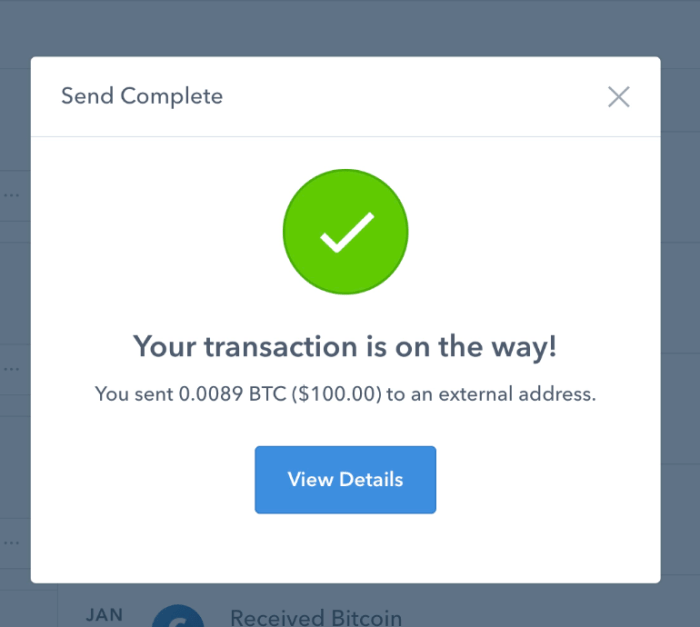
Once you’ve initiated the withdrawal, you can track its progress on a block explorer like Blockchain.com or Blockchair. These websites allow you to view the transaction details, including the transaction hash, block height, and confirmation status. Confirmations represent the number of blocks added to the blockchain after your transaction. Each confirmation increases the security of the transaction.
Typically, six confirmations are considered sufficient for a high level of security.
Transaction confirmation times can vary depending on the network congestion and the transaction fee you paid. During periods of high network activity, transactions may take longer to confirm. On a block explorer, the transaction hash is a unique identifier for your transaction. The block height indicates the position of the block containing your transaction in the blockchain. The confirmation status shows how many confirmations your transaction has received.
Advanced Security Considerations
For even greater security, consider using a multi-signature wallet. This requires multiple private keys to authorize a transaction, making it much more difficult for a hacker to steal your funds. Time locks allow you to set a delay before funds can be spent, providing an extra layer of protection in case your wallet is compromised. Address whitelisting, offered by some exchanges, allows you to specify a list of approved Bitcoin addresses that you can withdraw to, preventing withdrawals to unauthorized addresses.
Here’s a scenario:
Imagine a hacker gains access to your exchange account despite 2FA. With address whitelisting enabled, they wouldn’t be able to withdraw your Bitcoin to their own address, as it’s not on your approved list. Even if they manage to initiate a withdrawal, it would fail, protecting your funds.
Troubleshooting Common Transfer Issues
Bitcoin transfers can sometimes be delayed or fail. Common reasons include incorrect addresses, insufficient transaction fees, and network congestion. If you’ve sent Bitcoin to the wrong address, unfortunately, there’s usually no way to recover it. If the transaction is stuck due to a low fee, you might be able to use a “Replace-by-Fee” (RBF) transaction, if supported by your wallet and the exchange.
If you’re experiencing issues, contact the exchange’s support team or seek assistance from the Bitcoin community on forums like Reddit’s r/Bitcoin.
Here are some frequently asked questions:
| Question | Answer | Related Resource | Difficulty Level |
|---|---|---|---|
| How long does a Bitcoin transfer take? | Confirmation times vary, but typically 6 confirmations (around 30-60 minutes) are considered secure. | Blockchain.com | Easy |
| What if I send Bitcoin to the wrong address? | Unfortunately, it’s usually irreversible. Double-check the address before sending. | Bitcoin.org | Medium |
| What is a transaction fee? | A fee paid to miners to process your transaction. Higher fees generally result in faster confirmation times. | BitPay Fee Estimator | Easy |
| Can I cancel a Bitcoin transaction? | Not directly. You can attempt to use RBF if supported, but it’s not always successful. | Bitcoin Wiki | Medium |
Best Practices for Long-Term Cold Storage
Source: materialbitcoin.com
Regularly backing up your cold wallet’s seed phrase is essential. Store the backup in a secure, offline location, protected from physical damage and unauthorized access. Periodically review and update your cold wallet’s security settings, including firmware updates and PIN changes. Consider using a metal seed phrase storage solution for long-term durability. A good method involves writing your seed phrase on a fireproof and waterproof paper, then storing it inside a sealed, tamper-evident container in a secure location like a safe deposit box.
Last Word
Source: medium.com
So there you have it – a complete guide to safely transferring your Bitcoin from an exchange to a cold wallet. It’s not about being paranoid, it’s about being proactive. Taking these steps might seem a little involved, but the security benefits are huge. Remember, a little preparation now can save you a lot of heartache (and Bitcoin!) later.
Don’t rush the process, double-check everything, and prioritize protecting your seed phrase above all else. Cold storage isn’t just a good idea, it’s a fundamental part of responsible Bitcoin ownership. Now go forth and secure your future!
FAQ Corner
What’s the difference between a hot and cold wallet?
A hot wallet is connected to the internet (like an exchange wallet), making it convenient but more vulnerable to attacks. A cold wallet is offline, offering much stronger security because it’s isolated from online threats.
How often should I back up my seed phrase?
Whenever you make significant changes to your wallet or if you suspect your backup might be compromised. At least annually is a good rule of thumb, but more frequent backups are even better.
What if I accidentally send Bitcoin to the wrong address?
Unfortunately, Bitcoin transactions are irreversible. If you send to the wrong address, there’s usually no way to recover the funds. This is why double-checking the address is
-crucial*.
Is it safe to use a public Wi-Fi network during a transfer?
Absolutely not! Public Wi-Fi is notoriously insecure. Always use a secure, private network when handling your Bitcoin or any sensitive financial information.
What does “confirmations” mean on a block explorer?
Confirmations are validations of your transaction by the Bitcoin network. More confirmations mean greater security and assurance that the transaction is final. Typically, 6 confirmations are considered very secure.
